
This official Tom and Jerry Flash online game is 1.42 MB in size, so please allow some time for it to load...
 |
 |
 |
 |
 |
Bypass Screen Lock, Pattern Lock, and PINs without data loss (if possible) or via factory reset.
: Works with a broad range of MediaTek chipsets, including newer ones like MT6781 and MT6895. Basic Setup Requirements : Requires Python 3.8 or higher installed on your system. : You must install the standard USBDK driver for Windows to detect the device correctly. Device Entry
bkerler/mtkclient: Mediatek Flash and Repair Utility - GitHub free link mtk client tool v53
: Ensure "Driver Signature Enforcement" is disabled for the best compatibility. How to Use MTK Client Tool v5.3 Installation
Using service tools can lead to data loss or device "bricking" if used incorrectly. Always backup your data before proceeding. LibUSB filter driver or help identifying if your specific phone model is MediaTek-based Bypass Screen Lock, Pattern Lock, and PINs without
Download and run (or latest companion version).
Select Your Task: Navigate through the tabs (Service, Unlock, or Extra) and choose the operation you need (e.g., Erase FRP). : You must install the standard USBDK driver
Extract the downloaded MTK Client Tool V53 ZIP archive to a folder directly on your C:\ drive to avoid file directory string errors.
What are you trying to complete? (e.g., recovering a bricked device, bypassing a lock screen, backing up data)
This software interacts directly with the MediaTek Boot ROM (BROM) and Preloader modes to execute low-level commands.
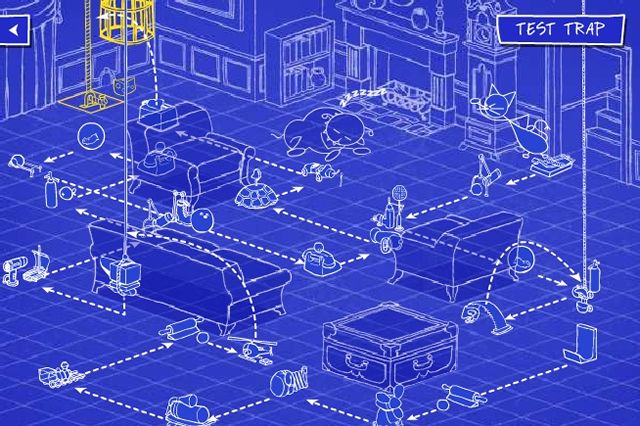
Here are three screenshots of a mousetrap that I built to give you an idea of how things work...
The blueprint for the completed mousetrap:
The actual trap just before it was set off:

The trap after it was set off and caught Jerry: