The following products can use this software for programming. The Slim range DAT1135, DAT4535, DAT4530, DAT4530, DAT4531A, DAT4531B, DAT4531C, DAT4531D, DAT4532A, DAT4532B, DAT4532C, DAT4532D, DAT4540, DAT4631A, DAT4631B, DAT4631C, DAT4631D, DAT4632D and the DAT4540. The Smart Series range . DAT1010, DAT1010 OEM, DAT1015, DAT1015 OEM, DAT1061, DAT1066, DAT2105 2W, DAT2105 3W, DAT4035 and the DAT4235. The Trip Amplifiers DAT5024AO and DAT5024P.
Datapro 1.2.7.0The DATPRO software replaces the Datasoft Programmable Software accept for the DAT4135 and older DAT4235. You may also need to download the USB driver below.
DATESOFT.2.7The DATPRO software replaces the Prosoft Programmable Software accept for the DAT4135 and older DAT4235. You may also need to download the USB driver below.
Prosoft 3.06Datasoft and Prosoft USB Driver
USB DriverThis software is used for the configuration of the DAT1485, DAT2000, DAT3000, and DAT10000 series of Modbus RTU products. This Software enables the configuration of the Communication Port and the input and output signal.
DAT3000, DAT10000 Configuration Software. V1.5.0.14. Jan 12 , 2025This software is used for the development and the configuration of the DAT9000, DAT9011 Modbus Controllers and the DAT9550 remote display. You can build function Block programmes and set up the Modbus Data Logger. The devise must be labeled V2.
Dev9K Ver 2.0.7.0 September 2023 Software DevelopmentSEARCH DEVICE is a Windows® software developed by DATEXEL, designed to search and modify network parameters for DAT 8000 and DAT9000 series devices.
Network search for the DAT8000 and DAT9000This software is used for the development and the configuration of the DAT9000 version 1.8, Must not be used with Version 2.
Dev9K Ver 1.8 January 2018 Software DevelopmentFor Smart, Slim and Trip Amplifier Programmers.
DataPro user Guide Prosoft user Guide Datasoft user GuideFor the DAT1485, DAT3000 and DAT10000 Software Development. Dev9k Development and DAT8000 search tool.
DAT3000 and DAT10000 User Guide Dev 9k User Guide DAT8000 Search tool User GuideModbus RTU RS485.
DAT1485 user Guide DAT3010 user guide DAT3011 user guide DAT3012 user guide DAT3014 user guide DAT3015-V user guide DAT3015-I user guide DAT3016 user guide DAT3017-V user guide DAT3017-I user guide DAT3018 user guide DAT3019 user guide DAT3022 user guide DAT3024 user guide DAT3028 user guide DAT3130 user guide DAT3140 8 user guide DAT3148-8 user guide DAT3148-12 user guide DAT3188 4 user guide DAT3188 8 user guidesFor the DAT3000 RS232
DAT3014 user Guide DAT3015-I user Guide DAT3015-V user Guide DAT3016 user Guide DAT3017-I user Guide DAT3017-V user Guide DAT3018 user Guide DAT3028 user Guide DAT3148-8 8 user GuideFor the DAT8000 range of products
DAT8014 user Guide DAT8015 user Guide DAT8016 user Guide DAT8017 user Guide DAT8017 user Guide DAT8018 user Guide DAT8019 user Guide DAT8024 user Guide DAT8130 user Guide DAT8148 user Guide DAT8188 8 user GuideModbus RTU RS485.
DAT10014 user Guide DAT10015 user Guide DAT10016 user Guide DAT10017 user Guide DAT10018 user Guide DAT10019 user Guide DAT10130 user Guide DAT10148 user Guide DAT10188 user GuideFor the DAT9000 series of Modbus Controllers
DAT9000 and DAT9000DL/USB V2 user guide Jan 23 2020 DAT9000IODL and DAT9000IOUSB V2 user guide Jan 23 2020 DAT9011 and DAT9011DL/USB V2 user guide user guide Jan 23 2020 DAT9000 and DAT9011 User Guide V1.8 24 Oct 2013 Network Search User Guide for DAT8000 and DAT9000 Series DAT9000 and DAT9011 User Guide for SD Ram only V1.6For the DAT7000 range of Canopen products
DAT7014 user Guide DAT7015 user Guide DAT7016 user Guide DAT7024 user Guide DAT7130 user Guide DAT7130 user Guide DAT7188 8 user GuideModbus RTU RS485.
DAT3000 Input Application Note DAT3000 Output Application Note DAT3012 Application Note DAT3130 Application Note DAT10000 Input Application Note DAT10000 Output Application NoteModbus TCP.
DAT8000 Input Application Note DAT8000 Output Application Note Network Search User Guide for DAT8000 and DAT9000 SeriesFor the DAT9000 range of Modbus Controllers
Setting up Ethernet connection to a Modbus RTU Master. Logging Temperatures over Modbus RTU RS485 with DAT9000DL Version 2. How to obtain a 4-20mA from a Modbus flow meter.For the DAT9000 range of Modbus Controllers
Setting up Ethernet connection to a Modbus RTU Master. Data Logging DAT9011USB Application Note How to connect to a Modbus Device DAT9xxx with Ethernet Using serial RS485 to configure a Modbus Master RTU Application Note with DAT9011-USB, DAT3011 and DAT9550. How to read Modbus registers from an external Instrument with DAT9xxx. Logging 4-20mA Input DAT9011USB Application Note Providing a 4-20mA output from a External Modbus Device Application Note Using a Remote Modbus Display and an 8 Channel Thermocouple Modbus Slave. HTTP Commands to down load files from DAT90XXUSB Application Note Sync Time on a Modbus Master Application Note Using Simply Modbus to read Temperature with Modbus Slave Thermocouple module. Using Simply Modbus TCP Client to communicate with 4-20 mA input DAT8015 Modbus Server.Modbus RTU RS485.
ISO9001 2025 Production Quality Assurance Rohs DirectiveModbus TCP.
For the DAT6000 range of PLC cards.
DAT6011 2 channel mV Thermocouple DAT6012 2 channel RTD, Resistance or Pot DAT6013 2 Channel Voltage Current PLC Input DAT6021 4 Channel Thermocouple PLC Input DAT6023 4 Channel Voltage PLC Input DAT6023 4 Channel Current PLC InputIf you need loop powered the best option would be the DAT4535 and if you need powered the best option would be the DAT4235. Datexel has another device that may be more cost effective. The DAT4532D is a dual signal conditioner which is powered.
DAT4535 DAT4235 DAT4532Dis a developer tool used to design and generate interactive reports within Microsoft Visual Studio. Version 13.0 specifically targets older development environments but remains crucial for legacy enterprise application maintenance.
Right-click inside the Toolbox panel and choose .
: You can find the general developer version listed on the Visual Studio Marketplace .
On development machines, use the "Developer Edition" installer (typically the .exe). For deployment to client machines or servers, use the "Runtime" installers (.msi), which are available in both 32-bit and 64-bit versions. Visual Studio Integration: Crforvs 13 0 Exe Downloadl
This public link is valid for 7 days and shares a thread, including any personal information you added. This link or copies made by others cannot be deleted. If you share with third parties, their policies apply. Can’t copy the link right now. Try again later.
user wants a long article for the keyword "Crforvs 13 0 Exe Downloadl". I need to gather information about this term. It looks like a misspelling of "CorelDRAW Graphics Suite 13.0" (possibly CorelDRAW X3). I'll search for related download sources, features, system requirements, and safety precautions. search results show that "CRforVS_13_0.exe" is related to Crystal Reports for Visual Studio. The user might have misspelled "CorelDRAW" as "Crforvs". I need to address both possibilities. I'll gather more details about the Crystal Reports component and its download, as well as information about CorelDRAW 13 (X3). search results show two distinct topics: Crystal Reports for Visual Studio (CRforVS) and CorelDRAW 13 (X3). The user's query "Crforvs 13 0 Exe Downloadl" likely refers to the Crystal Reports installer. I'll structure the article to address both possibilities, starting with the most likely match (Crystal Reports), then covering CorelDRAW X3 as an alternative, and finally discussing safety and alternatives. I'll cite relevant sources. search term you entered likely contains a small typo. "Crforvs 13 0 Exe Downloadl" points towards a specific file related to software development, although it may also be intended as a search for the graphic design software CorelDRAW 13. Here’s what you likely need.
If you are a programmer using Microsoft Visual Studio, the term "CRforVS" strongly suggests you are looking for . The file CRforVS_13_0.exe is the official installer for this reporting software, designed to integrate with Microsoft Visual Studio 2010. is a developer tool used to design and
Starting with Visual Studio 2010, Crystal Reports is no longer bundled with the IDE and be installed separately. Version Selection Table
Requires Microsoft Visual Studio to be installed.
For automated environments, community-maintained versions like those on Chocolatey provide various build versions (e.g., 13.0.34). Installation Guide Right-Click & Run as Admin: : You can find the general developer version
Before running the executable, close all instances of Visual Studio running on your machine.
: Ensure Visual Studio is closed during installation to allow the installer to integrate the reporting tools into the IDE . 2. Setting Up Your Project
: The term "Downloadl" is a common search engine typo for "Download".
: While version 13.0 was launched for Visual Studio 2010, subsequent Service Packs (SPs) extended support to later versions, including Visual Studio 2015, 2017, and 2019. Deployment and Runtimes
How to evaluate safely before downloading or running
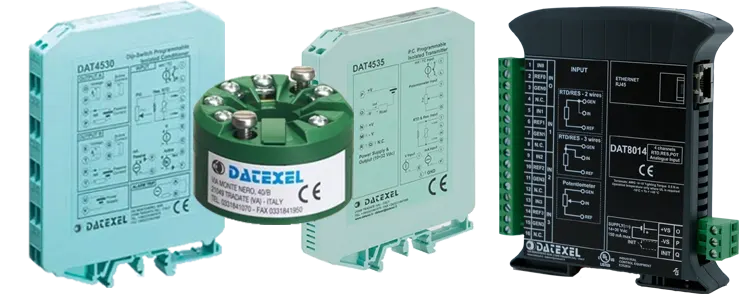
The DAT4235 can accept a 1-5 Vdc input and convert it to a 0-10Vdc output. It can accept any standard analog input and provide a 0-10Vdc or 4-20mA output. The DAT4535D is a dual converter that can accept Voltage and currect inputs and provide current and voltage outputs.
DAT4235 DAT4532DThe DAT4535 can do all the functions that the DAT4035. The new features that the DAT4535 has over the DAT4035 is the abbility to program the DAT4535 whilst no power is connected enableing fast configuration. Also the DAT4535 is DIP switch configerable.
DAT4535The DAT4235 replaced the DAT4135 and is able to perform the same functions and has more features. The new features that the DAT4235 has over the DAT4135 is the ability to program the DAT4235 whilst no power is connected enabling fast configuration.
DAT4235The DAT1066 also has the ability to be configured without a power supply connected. The DAT1066 provides 1500 Vac isolation. The DAT1066 can convert and isolate thermocouples and RTD's.
DAT1066